

How to Integrate AI Into Legacy Systems Seamlessly
Introduction
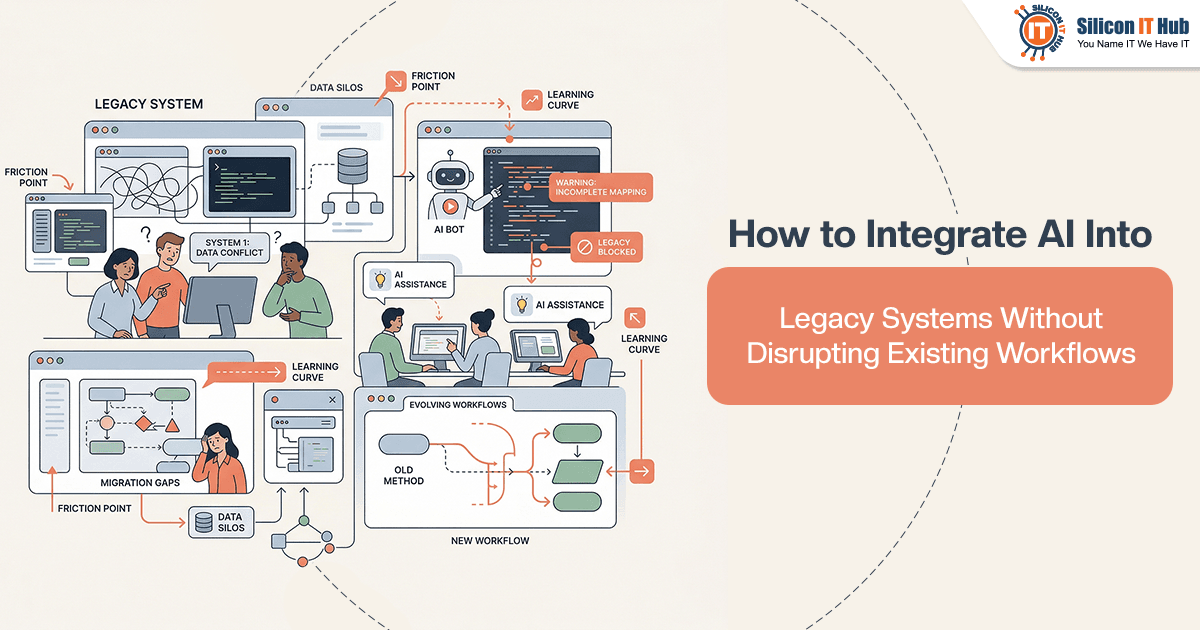
Here is how to integrate AI into existing software without rewriting it: leave the legacy system alone. You connect an AI model through an API or a middleware layer, point it at one read-only task, keep the existing application as the authoritative data source, and switch it on for a small group of 10-15 users first. If the model fails, people keep working the way they did yesterday.
This AI integration in legacy systems approach works when the legacy system exposes its data through a database view, an API, or a nightly file export. It breaks down when the logic you want to improve sits inside the application with no way to read it, and in that case splitting out one function as a separate service is the better route.
Document Four Facts About Your System, Then Pick One Task
Write down where the data is stored, how other software reads it, who approves changes, and which manual task costs your staff the most hours:
- Where the data is stored: the database engine and version (Oracle 11g, SQL Server 2012, DB2 on a mainframe) and any flat files that programs drop on an SFTP server.
- How other software reads it: REST or SOAP endpoints, ODBC or JDBC connections, nightly CSV exports, or nothing at all.
- Who approves changes: the person or committee that signs off on schema changes, new integrations, and downtime windows.
- Which task burns the most hours: retyping invoice fields, triaging support tickets, compiling month-end reports.
Choose a repetitive task, read-only for the AI, and checked by a person afterward. Invoice field extraction, ticket classification, and report drafting fit that description. Auto-approving payments does not, so leave it out of your first project.
Take a hypothetical 250-person regional insurer that runs a claims system built in 2009 on an Oracle database, with no API. Adjusters retype 15 fields from each vendor invoice PDF into the claims screen. The claims data sits in Oracle tables, while vendor invoices arrive in a shared folder. Other applications access the data through nightly exports, and the IT director approves any schema changes. Invoice re-entry is the most time-consuming manual task. The AI pilot extracts the 15 fields, shows them to the adjuster, and lets the adjuster accept or fix them.
Whichever task you pick, write one sentence that names the input, the AI output, and the person who checks it. If you cannot write that sentence, the task is too vague for a pilot project.
Pick the Legacy System Integration Pattern by What Your System Exposes Today
Use an API if the system has one, middleware if it does not, and events if the AI must react the moment something happens.
Use an API When the System Already Exposes One
If your CRM has REST endpoints, a small service can send each new support email to a language model and write a suggested reply into a draft field. An ERP with an inventory API can feed order history to a forecasting model and write reorder suggestions back as a report. In both cases, the screens and approval steps stay as they are.
Use Middleware When the System Has No Usable API
A middleware layer connects the legacy database to the AI service. It converts older data formats into requests the AI application can process, handles authentication, routes requests, and logs errors. Platforms such as MuleSoft Anypoint or an API gateway like Kong or Azure API Management cover this, and a small custom service covers it when the job is narrow. In the insurer scenario, a service watches the invoice folder, sends each PDF to Amazon Textract or Azure AI Document Intelligence, and stores the extracted fields in a separate review database, without a single change to the claims application.
Use Events When the AI Must React the Moment Something Happens
When a customer submits an order, the legacy system writes a database row. A change-data-capture tool such as Debezium reads that change from the database log and publishes it to Apache Kafka, where a fraud-scoring service picks it up and flags unusual patterns. On a mainframe, IBM MQ can carry the same messages. Event pipelines add infrastructure you have to run and monitor, so skip them when a nightly batch is fast enough for the task.
Check for an existing API first, because it is the least to build and the easiest to remove later.
Clean Only the Fields Your AI Pilot Reads
Fix data quality for the specific fields your AI pilot task reads, and leave the rest of the database alone until a later project needs it.
Audit those fields for duplicates, inconsistent formats, and gaps. Dates stored as MM/DD in one table and DD/MM in another, vendor names spelled three different ways, and blank tax IDs can each produce wrong output if you leave them in.
Give the AI a read-only path to those fields: a database view, a read replica, or a route on your API gateway that exposes only the invoice tables. Apply least privilege, so the service account can select from the invoice view and nothing else. Mask names and account numbers in test data, and encrypt traffic between the legacy system and the AI service.
Before the pilot starts, write down each field, its owner, and its required format. That list becomes your acceptance test.
Run the AI Beside Your Current Process Before It Touches Production
Run the AI in parallel with your current process, with a person checking each result, until its accuracy on your own data holds steady.
Start with a proof of concept on 200 to 500 historical invoices with names and account numbers masked. When extraction accuracy holds up on that set, connect the service to the legacy system through your API or middleware and run it in parallel: the AI extracts the 15 fields, the adjuster still types them, and a script compares the two. Set accuracy thresholds field by field from your own comparison data, because a misread invoice total costs more than a misread vendor address. Automate the low-risk fields that clear their thresholds, keep a person on the rest, and extend to a second department only after the first one has gone through a full month-end close with accuracy above your thresholds.
Parallel testing adds a manual verification step to every invoice. Start with a team that can accommodate this extra workload during the pilot.
Write the promotion rule before launch, in one sentence: which fields move to automation, at what accuracy, after how many weeks.
Split Out Microservices for Legacy Application Modernization Only When the Monolith Blocks the Pilot
Split a monolith only when you cannot read its data or cannot change one function without breaking another.
In that case, pull out functions with clear inputs and outputs first: notification sending, document processing, reporting, and fraud checks. Move each function into a separate service while the existing application handles the remaining operations. This follows the strangler fig pattern; the AI capability can then run inside the new service.
If your application is stable and exposes a database view, a distributed architecture adds deployment pipelines, service monitoring, and network failures you did not have before. Legacy application modernization is a fine goal for a separate project, and a poor reason to delay an AI pilot.
What Changes for the Insurer After the Invoice Pilot
In the insurer scenario, one task changes and the rest of the claims system stays put.
| What Changes | Legacy System Alone | Same System With the Invoice Pilot |
| Invoice entry | Adjusters retype 15 fields from each vendor PDF | Amazon Textract extracts the 15 fields, and the adjuster accepts or fixes them |
| Claims Application | Runs as built in 2009 | Stays untouched; a separate service reads the invoice folder and writes to a review database |
| Error Checking | The adjuster rechecks their own typing | A script compares the extracted fields with the adjuster’s entries during the parallel run |
| Data Access | Other software reads nightly exports | Same exports, plus one read-only view of the invoice tables |
| Added Effort | None | A checking step on each invoice for the pilot group, plus two to four weeks of discovery first |
Plan for Five Legacy System Integration Challenges Before the Pilot Starts
Plan for these five problems before the pilot starts: old protocols, staff resistance, security review, slow response times, and missing expertise. Each has a workable fix.
Old protocols. A SOAP service, a proprietary database driver, or an SFTP drop folder may not be able to call a model API directly. Put an adapter in front of it that converts to JSON over REST, and test the adapter against production-sized files, not samples.
Staff resistance. Claims adjusters may resist an AI tool that requires them to switch between the claims application and a separate review screen. Show the AI output inside the screen they already use, as a pre-filled value they can accept or edit.
Security and compliance. Connecting a model to a system of record creates new data paths. Encrypt traffic, restrict the service account by role, log each call, and mask personal data you do not need to send. If the data includes personal information, check whether your vendor contract permits sending it to a model provider and whether that provider retains it.
Slow response times. A legacy screen built for instant database lookups freezes while it waits for a model response. Call the model asynchronously through a queue, run it on separate infrastructure from the legacy servers, and cache repeated lookups.
Missing expertise. If nobody on your team has built an API adapter, a message queue, or a model integration, bring in specialists for the pilot and have them document the design for your staff.
Rank the five against your own system, and fix the top one before the pilot starts.
Keep Approvals in Place and Show AI Output Inside the Screens People Already Use
Show AI output as a suggestion inside the existing screen, and keep the human approval step for anything that moves money or changes a customer record. At the insurer, a purchase request above a set dollar amount from a vendor not seen in the past year gets flagged with a recommended decision, while the manager's approval step stays exactly where it was.
Place the output where the work happens: a panel in the CRM dashboard that summarizes the last ten customer interactions and proposes a follow-up, a suggested-reply field in the support portal, or a classification tag in the document management system.
Measure the pilot against a baseline you record two weeks before launch:
- Average task completion time
- Manual processing hours per week
- Data entry error rate
- Customer response time
- Cost per transaction
- Legacy system response time while the AI runs
- Share of pilot users who accept AI suggestions without editing
Expand the workflows that improve processing time or reduce errors. Pause any AI function that fails to meet its agreed performance targets after the first quarter.
Looking to Develop AI-powered Software for Your Enterprise?
LET’S CONNECTAssign Ownership and Choose an AI Integration Partner That Understands Your Legacy Architecture
Name one owner for each AI-assisted process before launch. That person decides who can change prompts or model versions, reviews flagged outputs each week, and runs the response when an output is wrong. Track the AI's accuracy against human corrections, set an alert for when it drops, and re-test whenever the model vendor releases a new version, because a silent model update can change results on data that used to pass.
If you hire an AI software development company, be wary of one that proposes a rebuild before it has read your database schema and watched your staff do the task. Look for hands-on work in:
- Legacy integration: SOAP services, mainframe messaging, ERP and CRM connectors
- API and middleware development
- Model integration and deployment
- Data engineering and migration
- Cloud infrastructure and security
- Ongoing maintenance of the integration
Ask each candidate to describe the pilot for your one chosen task in a page. A vendor that names your systems and your accuracy threshold has done the homework.
Your Next Step: Map One Workflow This Week
Write down one workflow where staff lose time to manual lookups or re-entry, the system that holds its data, and the output you want from AI. Then check three things: whether that system has an API or a database you can read, whether the key fields are consistent, and who approves changes to it. If all three come back clear, request an integration pilot scope from two or three AI software development companies. If any one stays unclear, pay for a two-to-four-week discovery before you commit to development.


 Have an Idea?Let’s Build It Together!