

What an AI App Development Company Should Set Up Before Writing Features
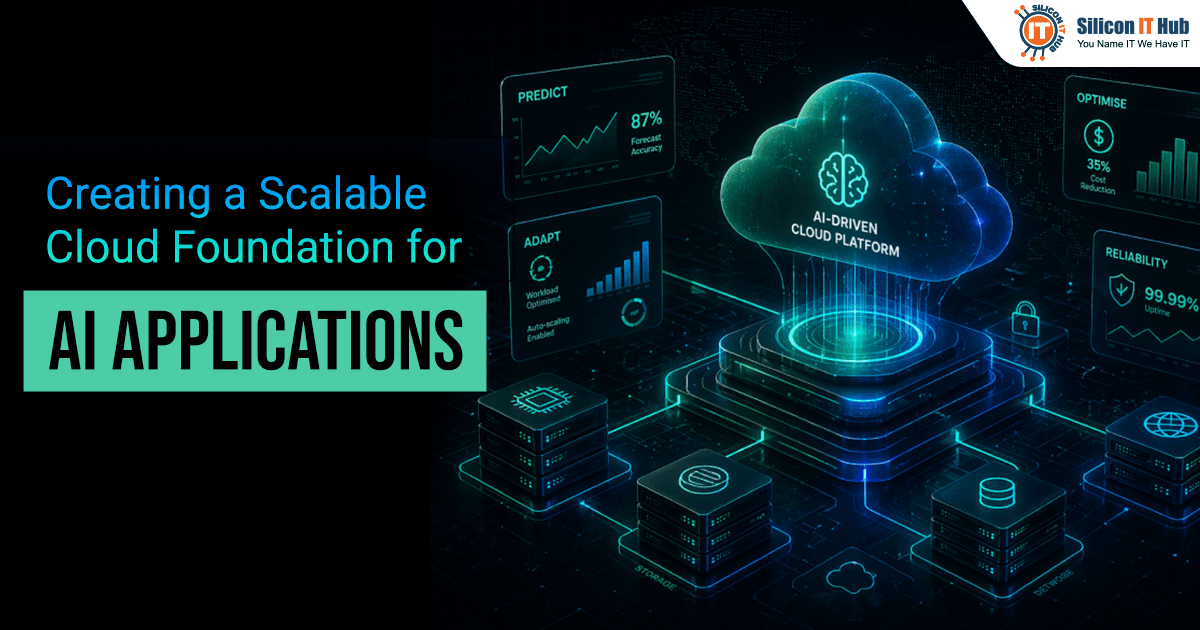
Building Strong Cloud Foundation for AI App Applications
A customer-support chatbot that answers five test requests a minute can take 20 seconds per reply once 300 people use it at the same time. The cause can be the cloud setup rather than the model, for example, when you add GPUs only after traffic spikes. A GPU must load your model before it can answer anything, so users wait while the new capacity starts.
An AI app development company plans for this early. These five decisions matter most:
- Separate training from serving
- Size GPUs from real traffic
- Build the data layer first
- Deploy through a pipeline you can roll back
- Set security and cost controls before launch
These steps help if you have a prototype and expect growth within a year.
How Better Infrastructure Planning Helps Control Cloud AI Costs
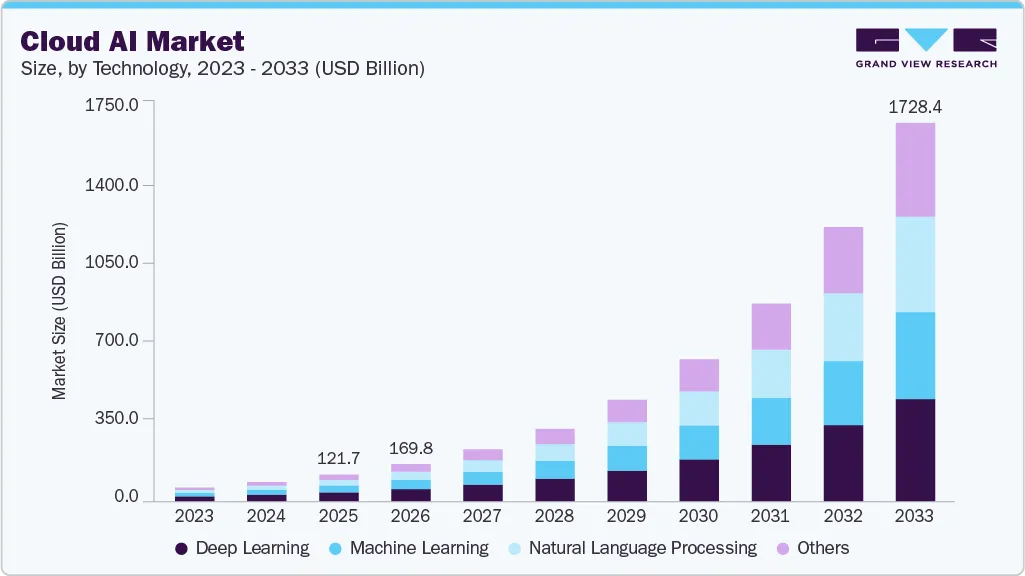
This matters more as the market grows. Grand View Research valued the global cloud AI market at $121.7 billion in 2025 and expects it to reach $1.73 trillion by 2033, a CAGR of 39.3% from 2026 to 2033.
Good infrastructure planning controls cloud AI costs because you pay only for the compute, storage, and data transfer your app actually needs. Most of the savings come from three things: GPUs sized to real traffic instead of guesses, training jobs that run on cheaper spot instances, and budget alerts that catch overspending early.
Five Decisions for Creating Scalable Foundation for AI Applications
Take an online retailer that launches an AI support chatbot before a holiday sale. In testing, the chatbot handles a few hundred chats a day. On sale day, thousands of shoppers open it at once.
The team added GPUs only after traffic went up, so each new GPU first had to load the model while customers waited. Return-document processing also ran on the same GPUs and took capacity away from live chats.
The fix was simple: keep a minimum number of GPUs ready, move document jobs to a queue, and turn on budget alerts so the extra capacity did not surprise the finance team.
Each of these fixes matches one of the five decisions below.
Separate Training and Serving in Your AI Cloud Infrastructure
Run model training and model serving separately, because they need different computing resources.
Model training - Model training may take hours to complete and can resume from a checkpoint in case of interruption. You can use spot instances for such tasks that handle interruptions.
Model Serving - It comprises processing user requests and requires continuous computation resources, responsiveness, and a backup if the server fails.
An optimal cloud AI infrastructure includes training and serving in different parts of the network and scaling groups. Kubernetes and Karpenter can scale each group separately.
Separate the model server, API gateway, and data pre-processing code into separate services. This enables you to scale the service that requires additional capacity without increasing costs for other services in the app. Companies can follow the best practices as listed below-
- Keep your computing resources closer to your data to avoid latency and data transfer costs.
- Implement stateless services; it will handle requests in case of failure.
- Use Terraform to build matching environments.
- Make your testing and production environments alike so that the load test would simulate real scenarios.
Managing multiple services is difficult. In the early stages of AI app development, a single managed model endpoint, such as an Amazon SageMaker endpoint, is sufficient.
Size GPU Capacity Based on Actual Usage
Estimate the GPU requirements using real traffic data, rather than guessing at the number of users you might have. If your prototype already works, use its request logs to understand typical demand and peak usage.
A GPU needs time to load your model before it can answer requests. If you add capacity only after the GPU is overloaded, users have to wait to receive responses. How you can prevent it -
- Look for the right signals – GPU utilization, pending requests, and response time
- Maintain minimum capacity – Always ensure that some GPUs have load and are ready for quick replies
- Put background tasks in queue – Keep some background tasks, such as document processing, in the queue until some GPU workers are available
- Ensure live services remain active – Live services such as chat applications will require free capacity to give quick responses
If your budget allows, start with two replicas for critical services. Then adjust according to performance and traffic.
Background tasks can take over the available resources. Real-time apps require some idle capacity that can support fast responses.
Build Data Layer Before Scaling Model
Plan your storage and data pipelines before adding more computing resources. Poorly organized data or slow data access can waste GPU capacity. The AI data infrastructure must contain the following elements-
- Object storage(e.g., Amazon S3) – Store raw data and datasets used for training
- Vector databases (pgvector/Pinecone) – Vector embeddings are used for similarity search purposes
- Log storage (Amazon CloudWatch Logs/OpenSearch) – Application and model logs are beneficial for troubleshooting
- Dataset versioning – Track changes to training datasets to help recreate previous model versions
Retrieval-augmented generation (RAG)-based applications search a vector database and then generate an answer. Hosting the database near the model-serving services can reduce network latency issues.
Build only the data setup for your present requirements, and add storage and pipelines as your user base grows. Avoid building a full-fledged data platform until you need one.
Deploy Models Through a Pipeline You Can Roll Back
Use an automated deployment pipeline to test new models, release them safely, and return to an earlier version if something goes wrong. Two popular ways of deploying AI models are -
Blue-green AI model deployment - Running the current model and preparing the next version simultaneously. When the new version is ready, perform the test and switch the existing model with it.
Canary release – Involves testing a small portion of the new model by using live requests and scaling up according to its performance.
For a safer implementation of your model, you can -
- Test your models before implementation
- Allow automatic rollback if there are more errors and slower responses
- Maintain a model registry such as MLflow
- Monitor response time, error rate, token consumption, and model performance
- Consider data drift that might affect performance
Canary release is a good option when you have a sufficient number of live requests to measure differences in error rates and response times between versions. Regular updates help you identify problems in generative AI infrastructure, such as slow container downloads and long model initialization times.
Before your first release, write down the error rate and response time that trigger an automatic rollback, so you are not making that call under pressure.
Set up Security and Cost Controls Before Launch
Security and cost management should be part of your cloud setup from the beginning.
AI Infrastructure Security Checklist
Give each service only the permissions it needs, and review those permissions on a regular schedule. Deactivate old accounts to prevent unnecessary access. Store credentials in a managed secrets service, such as AWS Secrets Manager or HashiCorp Vault. Encrypt data both at rest and in transit.
Keep internal model endpoints private, and authenticate API requests. Watch for prompt injection attacks in user inputs, and safeguard sensitive data. Maintain audit logs to track who accesses the models and the sensitive data.
Scalable Cloud Architecture Cost Management Checklist
Tag cloud resources by team or feature. It allows you to see where your money is going. Set budget limits and usage limits to prevent excessive resource consumption in one project.
Review your cloud costs every week during the first month after launch. Use a separate sandbox for experiments, and apply stricter limits to systems that work with customer data.
AI infrastructure security should protect AI model files, AI prompts, and the AI-generated output. Before launch, assign a manager for each checklist item listed above and ensure that the budget alerts are turned on.
Partner with Silicon IT Hub to build secure, scalable AI infrastructure tailored to your business needs.
LET’S CONNECTAudit These Five Layers Before You Build Scalable AI Infrastructure
Before you start scaling your application, consider these five layers
Computing - Are the training and serving infrastructure separated effectively?
Scaling with GPU usage - Does your application scale with traffic without causing more expenses and latency?
Data management - Are you able to manage your data efficiently in your application?
Model deployment - Can your application support model updates, monitoring, and rollback of failures?
Access control - Do you have access permissions, credential management, and budget management in your application?
Identify whether the component is complete, risky, or incomplete. Fix the layers marked incomplete first, starting with any that leave customer data exposed or block a rollback.
In the End - Score Your Five Layers Before the Next Sprint
Before your next sprint, score each of the five layers as complete, at risk, or incomplete, and fix the incomplete ones first. If three or more are incomplete, bring in an AI app development company before you build further. If your user base is still small, a single managed model endpoint is enough to launch while you close the gaps.
Write each decision down in a runbook, including why you made it, so new team members can see how the system works.
Silicon IT Hub is a renowned AI software development services provider in India. Our in-house experienced team of developers assists you in creating scalable AI infrastructure that meets complex business needs. Contact us for more information.


 Have an Idea?Let’s Build It Together!