

Comparing AI Coding Tools- Cursor vs Copilot vs Windsurf vs Claude Code
Overview
Choosing the best AI coding tools depends on the development workflow: Cursor suits developers who want an AI-first code editor, GitHub Copilot fits teams working within the GitHub ecosystem, Windsurf appeals to developers seeking an agentic IDE, and Claude Code is ideal for those who prefer terminal-based development.
This AI coding tools comparison examines Cursor, GitHub Copilot, Windsurf, and Claude Code based on their key features, strengths, limitations, workflows, and suitability for different development teams. It helps developers and engineering leaders make an informed decision based on their technical requirements, productivity goals, and existing development environment.
Best AI Coding Tools to Consider
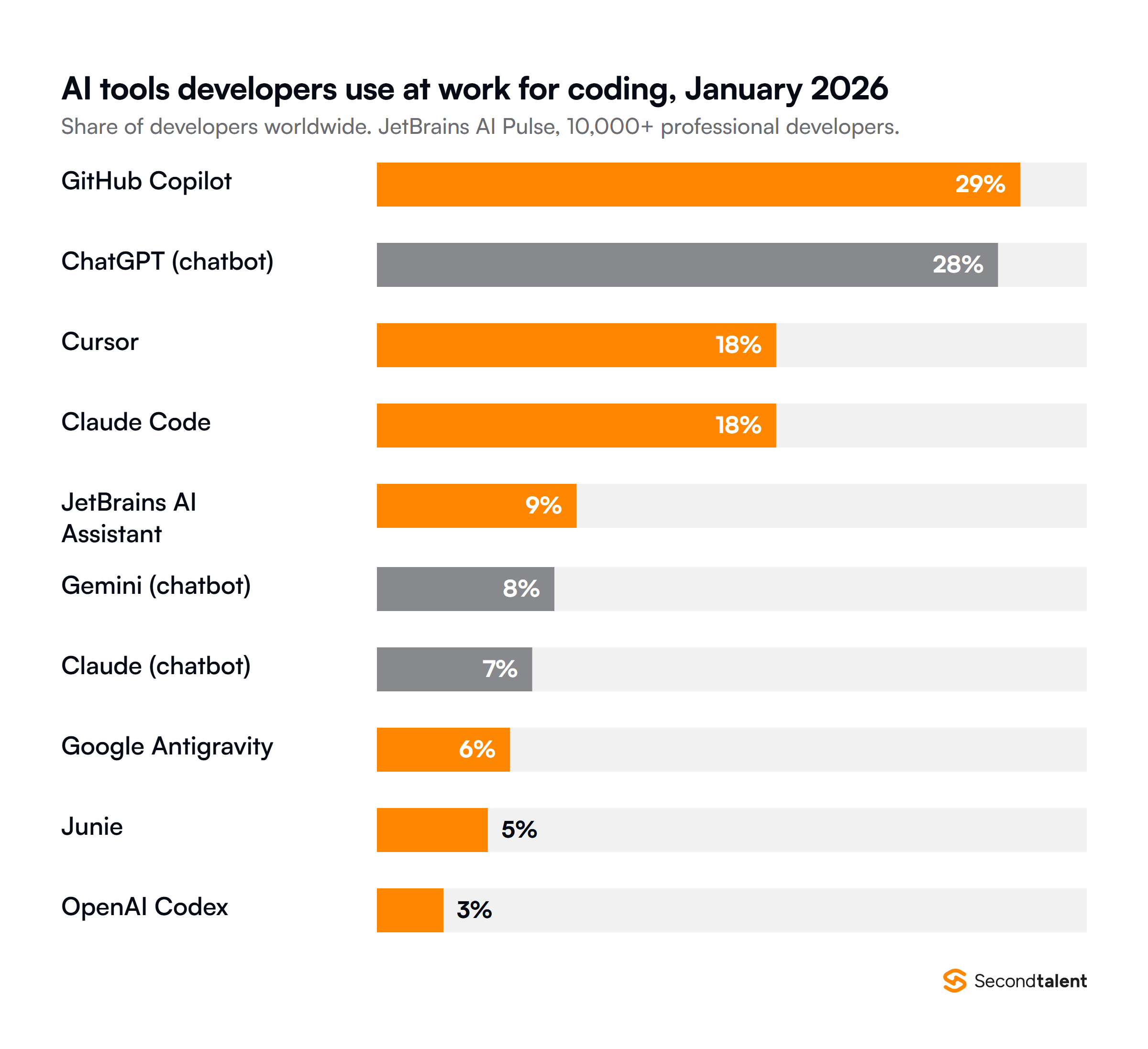
Cursor, GitHub Copilot, Claude Code, and Windsurf are among the best AI coding tools. JetBrains’ AI Pulse survey of more than 10,000 developers found that developers use AI tools actively at their workplaces. GitHub Copilot and Cursor are among the three most popular tools.
Source
These coding agents can take higher-level instructions. They can inspect files, search the repository, execute commands, and return the results for developer review. It is, therefore, necessary to evaluate AI coding assistants on various parameters. Some of these parameters are-
- Agentic task execution
- Debugging and testing
- Refactoring
- Model flexibility
- IDE and terminal experience
- Git and collaboration workflows
- Pricing and usage limits
- Ease of adoption
Let’s compare these AI tools for software development to choose the right option.
Cursor- Best for AI-First Development
Cursor is built around the idea that the editor should act as the AI development partner. It can inspect the codebase, plan changes, search the web, and work through complex development tasks.
It also supports multiple frontier models instead of forcing developers into a single model family. The combination of an AI code editor and an agentic workflow makes Cursor a preferred choice for developers. It provides developers with tools like MCP integrations, skills, hooks, and Bugbot.
Cursor is a great choice for:
- Individual developers who heavily rely on AI
- Startups building quickly
- Developers working on large or unfamiliar repositories
- Teams experimenting with agentic development
- Engineers who want multiple model choices
Finally, developers who want integrated coding, terminal, browser, and agent workflows prefer Cursor.
GitHub Copilot- Best for GitHub-Focused Development
Familiarity and ecosystem integration are two important benefits of GitHub Copilot. It works across popular development environments while remaining connected to GitHub’s repository, issue, and collaboration ecosystem. It enables developers to stay in a familiar coding environment.
If a development team uses GitHub for source control, pull requests, and project collaboration, Copilot can fit naturally into their existing lifecycles. Its agent mode can analyze a project, make changes across multiple files, and validate results. Cloud agents can also take assigned work.
GitHub Copilot works well when-
- Developers who prefer VS Code or other established IDEs
- Organizations already using GitHub for development
- Developers who want AI assistance without abandoning their existing workflow
Teams that focus on integrated code review and pull-request workflows prefer GitHub Copilot.
Windsurf- Best for Agentic IDE Workflows
This is a unique AI coding assistant for developers. Its core experience revolves around Cascade, its coding agent, and an IDE design. This platform is better than a typical AI code editor, with inclusions of an Agent Command Center and project-oriented Spaces.
As a robust development environment, Windsurf enables developers to work with AI agents across local and cloud workflows. The platform also supports plugins for environments such as VS Code and JetBrains.
Windsurf is ideal for the following-
- Developers who want an agent-first IDE
- Teams experimenting with autonomous development
- Developers working on complex repositories
- Organizations interested in a local plus cloud-agent workflow
Teams that look for deeper development-environment integration prefer this platform.
Claude Code- Best for Terminal-First Agentic Development
Claude Code takes a different approach than other AI programming tools. As a fundamentally terminal-oriented coding agent, Claude Code enables developers to work with Claude directly in the development environment. Developers can delegate substantial engineering tasks to the agent.
Anthropic introduced Claude Code as an agentic coding tool. It is designed to work from the terminal and appeals to developers who are comfortable with Git, shell commands, and existing editors.
Claude Code is specifically suitable for-
- Experienced developers who work in terminals
- Backend and infrastructure engineers
- Developers working on complex debugging tasks
- Engineers who prefer agentic workflows
Teams that want to integrate AI into existing command-line workflows prefer Claude Code.
AI Coding Tools- Cursor vs Copilot vs Windsurf vs Claude Code
A useful AI coding tools comparison can help developers select the right platform. It is, however, fair to say that the comparison is useful to focus on workflows rather than declaring a winner.
| Factor/Aspect | Cursor | GitHub Copilot | Windsurf | Claude Code |
| Primary experience | AI-first editor | AI assistant across IDE/GitHub | Agentic IDE | Terminal agent |
| Terminal workflow | Integrated | Available through CLI/agent | Integrated | Core experience |
| Model flexibility | Broad model choice | Broad model choice | Multiple model options | Claude family |
| Cloud-agent workflow | Available | Available | Strong emphasis | Agentic terminal workflow |
| Best fit | AI-first developers | GitHub-centric teams | Agentic IDE users | Terminal-first developers |
One-on-one comparison between these tools can help developers choose the right option.
Cursor vs GitHub Copilot Comparison
When it comes to comparing Cursor vs GitHub Copilot, the focus remains on an AI-first editor or an AI layer around an established development ecosystem. Developers choose Cursor if they want the editor itself to revolve around agents, repository understanding, and AI-driven implementation.
Copilot is useful when GitHub is a part of the development workflow. It enables developers to integrate AI into coding, issues, reviews, and repository operations. Cursor may feel more purpose-built, whereas Copilot can be easier to standardize for a GitHub-centered organization.
Cursor vs Windsurf Comparison
The comparison between Cursor vs Windsurf is more interesting because both are based on AI-first development environments. Both these environments work across multiple files, understand repository context, and execute larger development tasks. Cursor focuses more on model flexibility, agent tooling, MCP, and AI-first coding.
Windsurf lets you keep one workflow going while Cascade coordinates local and cloud agents through the Agent Command Center. Cursor should be a preferred option when developers need a mature AI-editor workflow. Windsurf is better when they opt for the local-to-cloud development model.
Cursor vs Claude Code
The choice between Cursor vs Claude Code is interesting because both tools represent different philosophies. Cursor may be easier for developers who want visual context, inline interaction, and an integrated development experience.
Claude Code attracts developers who are willing to review the agent’s work through a command-line workflow. It is fair to say that neither approach is inherently superior. The better choice depends on where the AI software development company uses AI within the process.
GitHub Copilot vs Windsurf
The GitHub Copilot vs Windsurf comparison gives a choice between ecosystem integration and an AI-native development environment. Copilot has a major advantage when GitHub is the center of engineering operations. Issues, pull requests, code review, and AI assistance can exist within a familiar ecosystem based on GitHub.
Windsurf focuses more on making the development environment agentic. It runs local and cloud agents together. Copilot may be easier for organizations that want minimal disruption. Teams that redesign the way developers interact with AI agents can use Windsurf.
GitHub Copilot vs Claude Code
The comparison of GitHub Copilot vs Claude Code becomes clearer when it comes to the developer’s interaction with each other. Copilot offers a broad set of AI development capabilities across editors, GitHub, CLI, code review, and cloud workflows.
Claude Code enables an agent to work through engineering tasks from the terminal. Copilot is compelling, especially when developers want AI available throughout the existing GitHub workflow.
Windsurf vs Claude Code
Windsurf vs Claude Code comparison is useful for developers moving beyond autocomplete. Windsurf offers a dedicated agentic IDE, while Claude Code provides a terminal-centered agent.
Windsurf is useful for visual development and browser previews. Claude Code, on the other hand, is useful when developers want to keep their preferred editor. It helps developers make the terminal their primary interface for AI-assisted engineering.
Importance of AI Pair Programming Tools
AI programming tools cannot replace engineering judgment or eliminate the need for experienced developers.
The best AI coding assistant for developers depends on several factors. For example, Cursor is an AI-first editor with powerful agents and broad model selection. GitHub Copilot is useful when developers want to integrate AI into repositories, pull requests, editors, and cloud development.
Windsurf is useful when the development team wants to use an agentic IDE with strong context awareness and an increasingly sophisticated agent model. When developers prefer a terminal-first experience and want an agent capable of handling substantial tasks, Claude Code is a preferred choice.
Why Choose the Right Platform for Developing AI Software
An AI software development company needs to select the right coding platform. It should consider factors like technology stack, development methodology, client requirements, repository architecture, and governance model.
For example, a startup building a new SaaS product may prioritize agentic development. A 40-person agency supports clients on both GitHub and GitLab.
It is fair to say that the next generation of AI tools for software development will understand repositories, use external tools, execute tests, create pull requests, and work asynchronously. Cursor has started extending its agents into cloud workflows, and GitHub Copilot offers cloud agents with repository-level workflows.
Final Words
Cursor, GitHub Copilot, Windsurf, and Claude Code are advanced and reliable AI tools, but they solve development problems from different angles. As a reliable, all-round choice for developers, Cursor gives an AI-first coding environment. GitHub Copilot is compelling for organizations that rely on GitHub and IDE workflows.
Windsurf is useful for developers who want a highly agentic IDE and coordinated local agents. Claude Code is a powerful terminal-first option for development teams who want to delegate substantial engineering tasks. You can list your Git host, preferred editor, and security requirements, then pilot the best-fit tool on one repository.
It is fair to say that an AI coding assistant is more than a productivity experiment. The right choice of tool is an essential part of a disciplined software development process. If your team lives in GitHub, start with a Copilot pilot. If your engineers live in the terminal, trial Claude Code.
Silicon IT Hub is a leading AI app development company. Our advanced and generative AI solutions can meet complex business needs effectively. Contact us to learn more about our services.


 Have an Idea?Let’s Build It Together!