

Play Store vs. App Store- Key Differences You Need to Know for App
Introduction
A mobile application with excellent functionality and a user-friendly experience can take your enterprise to a new level. It is, however, essential to understand various aspects and differences between the Google Play Store vs App Store before publishing your app. Developers must fulfill technical requirements, privacy policies, security standards, content rules, and review procedures as per the specific platform.
The app publishing process is substantially different for Android OS and iOS. This is a reason a clear Play Store vs App Store comparison is essential before deploying your new mobile application. Both Google Play and Apple’s App Store provide global distribution, developer tools, and different approaches. This blog discusses the differences from the perspectives of reviews, fees, and other requirements.
Play Store vs. App Store- Applications Keep Adding
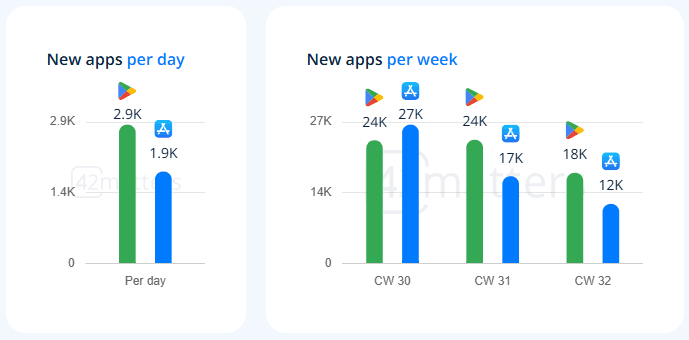
Google Play Store and Apple App Store are two prominent platforms for deploying apps for Android OS and iOS, respectively. Both these app stores have over 2.5 million apps available to download. As per the 42matters report, every day, around 3000 apps are added to both the Play Store and the App Store. This figure reaches more than 21K apps every week on both these platforms.
Source
Both of these stores have the same objective- to provide users with a secure marketplace for discovering and downloading apps. Their implementation and approval processes are, however, different. Here is a glimpse of Play Store vs. App Store.
| Factor | Google Play Store | Apple App Store |
| Platform | Android OS | iOS, iPadOS, and other Apple platforms |
| Developer Account | Google Play Console Account | Apple Developer Program Membership |
| Review Approach | Automated checks plus human review | Automated checks |
| Testing | Internal, closed, and open testing options | TestFlight |
| Distribution | Google Play and other Android distribution channels | Primarily Apple ecosystem |
| Main App Package | Android App Bundle (AAB) | IPA generated through Apple’s ecosystem |
| Review Philosophy | Strong focus on technical quality, security, and compliance | Strong focus on functionality, privacy, content, design, and user experience |
| Payment Ecosystem | Google Play Billing for applicable digital purchases | In-App Purchases for applicable digital goods and services |
| Developer Fee | Generally an annual registration fee | Annual membership fee |
| Approval Timeline | Often relatively quick | Can vary depending on review and app complexity |
The exact requirements and commercial terms for your app are unique and different. It is, therefore, better to consult a reliable mobile app development company to understand these differences.
Google Play Review Process
The Play Console provides the Google Play publishing workflow. This workflow follows a specific pattern. The developer prepares the application for store listing, uploads the necessary Android App Bundle, completes policy declarations, configures testing, and submits the app for review. Google evaluates applications against its Developer Program Policies and other technical requirements. Here are some of the areas of evaluation for the application-
- Malware and security risks
- User data handling
- Restricted content
- Intellectual property
- Permissions
- Advertising practices
- Payments
- Children and data safety
- App functionality
- Metadata accuracy
Google may use automated systems. These systems can identify potential issues in the app before or alongside human review. Here, it is fair to say that passing one review does not guarantee that Google will approve every future release automatically. Changes to functionality, permissions, monetization, or data practices may lead to more scrutiny.
Apple App Store Review Process
The iOS giant Apple has adopted a more structured and visible human review workflow for the app. Developers can submit their applications through App Store Connect. They need to provide -
- App metadata
- Screenshots
- App description
- Age rating
- Pricing information
- Build information
- Privacy details
Apple’s App Review team evaluates the submitted application against its guidelines. Apple takes a more stringent approach in reviewing the app.
App reviewers at Apple can assess app functionality, user experience, privacy practices, security, payment, advertising, account management, intellectual property, and completeness. The submitted app should work completely and be ready for users. Placeholder content, broken features, incomplete flows, or inaccessible functionality can cause problems. It is better to consult reputable companies that offer excellent iOS app development services.
Such companies can prepare your app for the App Store’s review criteria. They take care of the review process, especially during the development and QA stages.
Apple vs Google- App Approval Time
This is one of the most common questions for modern businesses: How long will it take for my app to get approved? It is difficult to say because approval time depends on several factors, including the app’s complexity, policy sensitivity, number of issues, quality, and additional information. When comparing Apple vs Google app approval time, developers often find that Google Play has a relatively streamlined publishing process.
Apple’s review process may involve more detailed scrutiny. It is, therefore, better to include a review buffer in the launch schedule and prepare for potential app resubmission. Let’s dig deeper into some valid reasons that cause app rejection.
Why Apps Get Rejected
Most app rejections are not random. Some of the preventable issues may lead your app toward rejection. As compared to the Google Play Store, Apple’s App Store follows more stringent standards. We mentioned some specific reasons for an iOS app’s rejection on the App Store. Here we mention some common reasons you should address to get your app approved by both these stores.
- Incomplete Functionality
- Privacy Concerns
- Excessive Permissions
A reliable and experienced mobile application development company can evaluate the reasons for rejection and address them effectively.
Play Store vs App Store Fees
Both these ecosystems have different fees. They need to be considered thoroughly while publishing apps. Both Google and Apple charge developers an annual fee for their developer programs. These platforms may change commissions on certain transactions using their respective payment systems.
The exact percentage of commissions can vary based on the type of transaction, revenue level, subscription status, regional rules, and applicable program.
App Store vs Play Store Comparison for Business Owners
Business owners can select any one or both platforms as per their target audience and other relevant aspects. The development strategy differs as per the platform. Here is a quick table of comparison between the App Store vs Play Store from the perspective of business owners.
| Factors to Consider | Google Play Store | Apple App Store |
| Target audience | Large and diverse, using Android OS | Strong and affluent people using iPhones |
| Device diversity | High | More controlled ecosystem |
| Testing challenge | Greater hardware fragmentation | More standardized device ecosystem |
| Review preparation | Policy and technical compliance | Detailed policy, privacy, and UX compliance |
| Beta Testing | Multiple play testing tracks | TestFlight |
| App monetization | Google Play Billing for applicable transactions | In-App Purchase for applicable transactions |
| Release planning | Account and testing requirements should be checked early | App Store review preparation is essential |
| Development focus | Compatibility and device testing | UX, privacy, and platform-specific behavior |
As a business person, you need to make the right strategy that includes factors like target audience, geographic location, business model, and technical requirements.
Looking to develop a Native Mobile Application with a Seamless Performance?
LET’S CONNECT!How to Prepare an App For Successful Publishing
A successful launch or release of your app requires a proper roadmap. It is, therefore, necessary to make a publishing strategy well before launch. Here are the steps that can make your app ready for publishing on app stores.
Step 1. Define Requirements
It starts with determining the platform. Businesses should identify the platform (Android OS or iOS)or ecosystem-related requirements early.
Step 2. Design Properly
It is essential to build the application by keeping privacy, permissions, and payment requirements in mind.
Step 3. Test Continuously
You can conduct functional, security, performance, and device compatibility testing by using beta-testing channels.
Step 4. Prepare Assets
It is necessary to maintain accuracy in store assets like app name, descriptions, screenshots, icons, and promotional information.
Step 5. Review Policies
Both stores can change policies frequently. It is, therefore, necessary to verify the latest app requirements before submitting the app.
Step 6. Build a Buffer
This step requires businesses to spare additional time for review, fixes, resubmission, metadata changes, and potential rejection.
Every application passes through a comprehensive and stringent review process in app stores. This step-by-step guide can help you prepare your Android or iOS application for publishing. It is, however, better to choose the right mobile app development company to make an effective blueprint for app store submission.
Why Choose the Right Development Partner for Your App
Fulfilling app publishing requirements is just as important as including the desired features during development. The app development partner has a significant impact on the quality of architecture, testing, security, and release readiness of your application. An experienced mobile application development company can make a difference in both development and publishing.
Companies should consider the app development company’s experience in
- Native Android development
- Native iOS development
- Cross-platform development
- API integration
- Mobile security
- Payment integration
- Performance optimization
- App Store submission
- Data security
- Application testing
- Play Store submission
- Post-launch maintenance
If you require platform-specific expertise for your app, you can partner with specialized providers of Android app development services or iOS app development services.
Here, it is fair to say that you should involve the app development partner early enough. This is necessary because platform compliance is also an essential part of an app development project. This can help you avoid common mistakes, including testing only on one device, ignoring post-launch compliance, and using inaccurate information. Other mistakes are assuming that approval is certain and leaving compliance until sending it for publishing.
Concluding Lines
The Play Store vs App Store decision requires considering several factors beyond Android OS and iOS. Each ecosystem has different approaches for review, testing, payments, privacy, and publishing applications. Google Play Store offers a broad Android ecosystem that has a diverse range of devices. Apple App Store, on the other hand, offers a more controlled ecosystem, focusing more on app quality, privacy, functionality, and user experience.
Whether you want to partner with an Android app development service provider or invest in iOS app development services, the core objective remains the same. You need a secure, reliable, and user-focused app that offers a seamless experience to get published on app stores. You can take the assistance of experienced developers and make a complete roadmap to ensure successful publishing of your application.
Silicon IT Hub is a reputable mobile app development company. Our in-house teams of experienced app developers can make native applications for Android OS and iOS. We assist our esteemed clients in publishing their business applications on the Google Play Store and Apple App Store. Contact us to learn more about our end-to-end app development services.


 Have an Idea?Let’s Build It Together!